Download WooCommerce Lightspeed POS Integration free with SrmehranClub membership. Exact files as listed on the official site. No license keys or author support. GPL pre-activated.
Connect WooCommerce to Lightspeed Retail and keep inventory in sync across both systems
The Lightspeed Retail Point of Sale integration for WooCommerce enables your WooCommerce store and Lightspeed Point of Sale account to communicate and keep inventory in sync.
When a new sale comes in via your Point of Sale system, stock quantities are updated within WooCommerce. When a new order arrives via WooCommerce, your Lightspeed Retail account reflects the same inventory numbers.
Multi-store configuration
This extension can handle multiple stores from your Lightspeed account. However you must set one primary inventory source for WooCommerce.
Tick the checkbox(es) of stores from which you want to import products.
Tick the primary inventory store – this is the store that the plugin will use to sync inventory to and from.
Save changes.
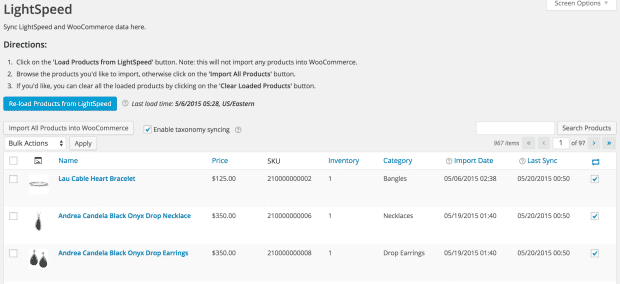
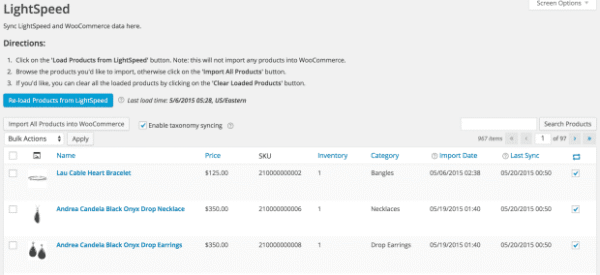
Import and Sync Products from Lightspeed POS
There are five actions that can be performed on products loaded from Lightspeed:
Import & Sync?– Makes the products live on your WooCommerce store and adds to the sync schedule. What does this mean? Your product is now available in WooCommerce >> Products. It is published and visible in the front end. Also a sync link relationship is now established. The WooCommerce product and it’s Lightspeed source product are now linked to each other. The extension installs a CRON job that runs every five minutes, to ensure that items with established sync links are added to the sync list. Items are synced every 24h and additionally on these events.
Import –?Makes the product live on your WooCommerce store, but doesn’t attempt to sync it with Lightspeed later. No sync link relationship is established.
Sync?– Adds an imported product to the sync schedule only and establishes a sync link. If a product has not been imported, it cannot be synced.
Update?– Pulls all Lightspeed data and immediately updates the WooCommerce product linked to it. Caution: This will override attributes of live products in your store!
Delete?– Removes a product from the table of loaded Lightspeed POS products.
Changelog
From changelog.txt in the download
Version 3.4.0Latest2 new4 improved5 fixed1 other
New
Mark Lightspeed POS X-Series sales as paid and closed by recording a payment of a chosen Lightspeed payment type when the WooCommerce order is paid
Add an exclusion tags setting for Lightspeed POS X-Series so staff can control from Lightspeed which products appear in WooCommerce
Improved
Skip the Lightspeed inventory check when a crawler or bot adds a product to the cart, preserving API rate limit for real shoppers (R-Series and X-Series)
Download Lightspeed POS X-Series product images in batches with immediate follow-up runs, so large catalogs import images much faster
Update WooCommerce product images when they are replaced in Lightspeed POS X-Series, and show pending image downloads on the Sync screen
Update the bundled Fenix framework to v1.13
Fixed
Retry Lightspeed POS X-Series product image downloads after a temporary failure instead of dropping the image
Apply Lightspeed POS X-Series background polling frequency changes as soon as the settings are saved
Reuse existing media library images when reconnecting Lightspeed POS X-Series, instead of downloading the whole catalog's images again as duplicates
Allow X-Series product image sync to initialize on sites with a long database table prefix
Show the Lightspeed POS R-Series sales sync settings fields and stop failing order syncs when the enable option was stored in a legacy format
Other
Require WordPress 6.3+ and WooCommerce 9.9+
Show 5 earlier versionsVersion 3.3.93 improved7 fixed
Improved
Add a filter to skip the Lightspeed POS R-Series inventory pull when a product is added to the cart
Add a filter to change the Lightspeed POS R-Series API timeout for storefront requests
Update the bundled Fenix framework to v1.12
Fixed
Stop a "translation loading was triggered too early" notice on sites where WP Cron is disabled or loopback requests are unavailable
Prevent an error from breaking the Lightspeed POS X-Series Sync screen when an activity log entry refers to a deleted order
Show a notice, rather than erroring out, when the OpenSSL PHP extension required to store Lightspeed credentials is missing from the server
Send a product's barcode to the Lightspeed POS R-Series EAN field, not the UPC field, when the UPC/EAN strategy is set to EAN
Show a notice and stop repeated import errors when a Lightspeed POS R-Series matrix attribute name is too long for WooCommerce
Correct the Lightspeed POS R-Series stock after a refund without restocking even when stock quantity is not synced back to Lightspeed
Keep the storefront responsive when the Lightspeed POS R-Series API is slow or rate limited, instead of letting add to cart and checkout requests pile up
Version 3.3.85 fixed
Fixed
Prevent Lightspeed POS X-Series from deducting a product's stock twice in Lightspeed when a WooCommerce order syncs due to race conditions
Apply Lightspeed POS R-Series API rate-limit pacing to storefront requests, and shorten rather than skip the delay when a request is low on execution time
Convert product dimensions correctly when importing from Lightspeed POS X-Series into a store using a different metric unit, such as centimeters into millimeters
Convert product weights correctly when importing from Lightspeed POS X-Series into a store using grams or carats
Keep Lightspeed POS R-Series stock unchanged when a WooCommerce order is refunded without restocking the refunded items
Version 3.3.72 fixed
Fixed
Keep the Lightspeed POS X-Series product price unchanged when only stock is synced, so an online order no longer overwrites the price set in Lightspeed
Ensure a simple product merged into a Lightspeed R-Series matrix becomes a visible variation in WooCommerce even if it was in draft status
Version 3.3.64 improved1 fixed
Improved
Allow changing the Lightspeed POS X-Series register within the same outlet after data has synced, without a full reset or disconnect
Add a Re-sync from Lightspeed action for individual and selected Lightspeed POS X-Series products and customers
Add an order note when a Lightspeed POS R-Series sale is not synced because the order has no linked products
Prevent redundant Lightspeed POS R-Series product syncs when bulk-editing products, so accounts hit fewer rate-limit errors
Fixed
Prevent a double refund in Lightspeed POS R-Series when cancelling an order that had an earlier partial refund
Version 3.3.52 fixed
Fixed
Create variable products in Lightspeed R-Series even when the matrix attribute set already exists
Prevent repeated import errors when a Lightspeed POS R-Series matrix attribute is named with a reserved word such as Type
Showing the latest 6 of 100 versions.
Specification
Overview
Customer Reviews
Reviews
There are no reviews yet.
Be the first to review “WooCommerce Lightspeed POS Integration 3.4.0” Cancel reply














Reviews
There are no reviews yet.