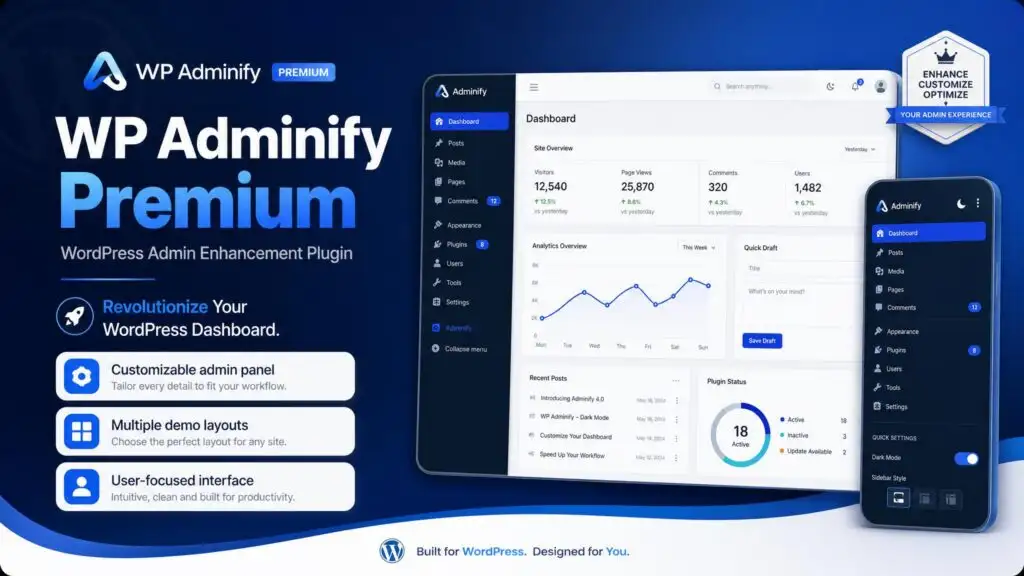
WP Adminify is a WordPress plugin that enhances the admin dashboard by offering features like dark mode, menu editing, and white labeling. It streamlines workflow with tools for media management, custom admin pages, and performance monitoring, making it ideal for developers and agencies looking to boost productivity.
Download WP Adminify Premium free with SrmehranClub membership. Exact files as listed on the official site. No license keys or author support. GPL pre-activated.
WP Adminify Premium — Enhance Your WordPress Admin Dashboard
Transform Your Admin Experience
WP Adminify is a powerful WordPress plugin designed to enhance and customize your admin dashboard. Once activated, it takes over the standard admin interface, offering features like dark mode, menu editing, and white labeling. This customization not only improves aesthetics but also boosts productivity by providing a more tailored user experience.
Boost Productivity with Essential Tools
With WP Adminify, you gain access to various productivity tools, including media folders for better file organization, custom admin pages for specific tasks, and interactive dashboard widgets to keep essential information at your fingertips. These features help streamline your workflow, allowing you to focus on what matters most—growing your website.
Performance Monitoring and Admin Tweaks
In addition to interface improvements, WP Adminify includes performance monitoring through Google PageSpeed Insights. This feature helps you keep track of your site’s performance and identify areas for improvement. Moreover, numerous admin tweaks are available to streamline your backend experience, making it easier to manage your WordPress site efficiently.
Compatibility and User-Centric Design
This plugin is ideal for developers and agencies who require a flexible solution. WP Adminify supports RTL languages, multisite setups, and popular plugins like WPML, ensuring that it fits seamlessly into your existing workflow. Its compatibility with various environments makes it a versatile choice for enhancing any WordPress site.
Instant Download and Regular Updates
When you choose WP Adminify, you benefit from instant download access. This means you can start enhancing your admin dashboard immediately after purchase. Furthermore, regular updates ensure that you always have the latest features and improvements, keeping your admin interface fresh and functional.
Who Should Consider WP Adminify?
WP Adminify is best suited for WordPress site owners, freelancers, and small agencies looking to improve their admin experience. If you spend significant time in the WordPress dashboard and are seeking tools to enhance productivity and customization, this plugin is an excellent investment.
What to Know Before Downloading
Before downloading, remember that WP Adminify is a premium plugin. It is designed to be user-friendly and integrates smoothly with existing themes and plugins. Whether you manage a single site or multiple installations, WP Adminify can adapt to your needs and enhance your overall WordPress experience.
Final Thoughts
WP Adminify Premium is a game-changer for those looking to optimize their WordPress admin dashboard. With a wealth of features aimed at improving usability and efficiency, it’s an essential tool for anyone serious about managing their site effectively.
Changelog
From changelog.txt in the download
Version 3.2.4.41 new4 improved5 fixed
New
Mini Mode Icon option added
Improved
Horizontal Menu hide on Gutenberg Editor, Style issues fixed
RTL Accordion & Toggle Menu style issue fixed
Admin Pages – User roles display issue fixed
Google Fonts – Body Font not working issue fixed
Fixed
Admin Columns not hide on WordPress Default UI issue fixed
Login Customizer – RTL Login Form not working issue fixed
Amelia Booking – Admin Menu not working issue fixed
Media – Default UI Media Tabs focus issue fixed
Media – Default UI Media Select Checkbox style issue fixed
Show 5 earlier versionsVersion 3.2.4.32 improved13 fixed
Improved
Dark Mode Icon on frontend display issue fixed
Optimized script loading on Customizer, Login, Register page
Fixed
Admin Bar Frontend padding issue fixed
404 page on Setup Wizard fixed
Footer Credit url bug fixed
Account Tab showing on footer fixed
"New” button in admin bar style is not working
Gutenberg Block Editor style issues update – side panel paragraph style, dismiss notice icon color
Gutenberg Block Editor FullScreen Mode Admin bar and Main menu issue fixed, Editor Tools Insert Icon issue fixed.
Dashboard Welcome Widgets not showing issue fixed
+5 more
Admin Pages not showing on Menu issue fixed
Squirrly SEO plugin Meta fields not showing issue fixed
Advanced Database Cleaner Pro style issue fixed
Login Customizer – Video, Slideshow not working issue fixed


 Overview






Reviews
There are no reviews yet.